
Introduction
The CTO of a cabinet-level federal agency faced a decision that would affect 15,000 employees: selecting the agency’s enterprise video conferencing platform. “We spent six months evaluating every major solution,” he told me. “We needed something that checked every box: security, compliance, usability, cost, and reliability.”
“The challenge wasn’t finding options—it was that every vendor claimed to be ‘perfect for government.’ Marketing materials all looked the same: government-ready, secure, compliant, proven. But when we dug deeper, huge differences emerged.”
“One platform had great features but couldn’t operate in our SCIFs. Another was inexpensive but would cost us millions in lost productivity due to poor usability. A third claimed FISMA compliance but meant ‘working toward’—they had zero federal ATOs. One required cloud-only deployment violating our data sovereignty requirements.“
The agency eventually selected a solution meeting their specific needs—but only after months of rigorous evaluation revealing which vendor claims were marketing versus reality.
This guide provides government agencies with comprehensive, honest comparison of the best video conferencing solutions for 2025. Not marketing claims, but real-world assessment of capabilities, limitations, costs, and fit for different government use cases.
Whether you’re federal, state, local, defense, or special district—this guide helps you select the right solution for your specific requirements.
Let’s start with evaluation criteria that matter for government.
Evaluation Criteria for Government Solutions
Government video conferencing requirements differ fundamentally from commercial solutions.
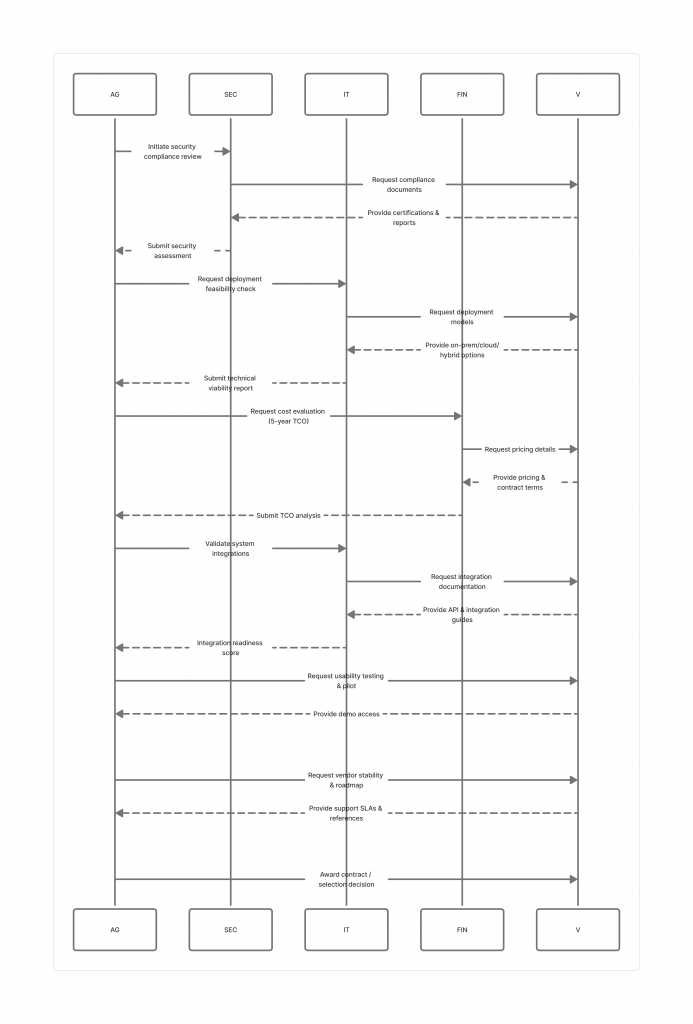
Critical Evaluation Factors
1. Security and Compliance (Weight: 30%)
Federal Requirements:
- FISMA compliance capability
- NIST 800-53 security controls
- FedRAMP authorization (cloud solutions)
- Authority to Operate (ATO) track record
Defense Requirements:
- DISA Security Requirements Guide (SRG) compliance
- CMMC Level 2+ capability
- SCIF deployment capability
- Cross-domain solution integration
Evaluation:
- Existing government ATOs
- Security certifications (not just claims)
- Encryption architecture
- Data sovereignty options
2. Deployment Flexibility (Weight: 20%)
Options Matter:
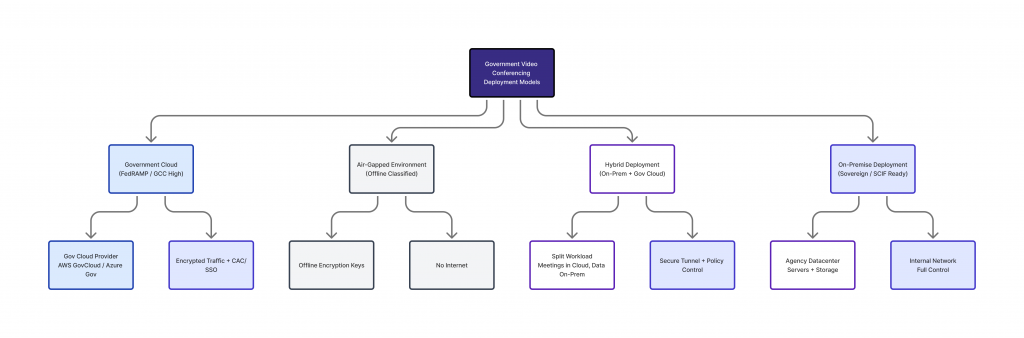
- On-premise deployment (data sovereignty)
- Government cloud (FedRAMP/StateRAMP)
- Hybrid deployment
- Air-gap capability (SCIF use)
Why It Matters:
- Some agencies require on-premise
- Cloud may violate data sovereignty
- SCIFs cannot use commercial cloud
- Flexibility supports varied requirements
3. Total Cost of Ownership (Weight: 15%)
Beyond License Costs:
- Initial licensing/infrastructure
- Annual subscription/maintenance
- Implementation costs
- Training and support
- Hidden costs (add-ons, overage fees)
- Long-term price predictability
5-Year TCO Analysis:
- More important than initial price
- Includes all costs over contract life
- Reveals true value
4. Integration with Government Systems (Weight: 15%)
Essential Integrations:
- Active Directory / LDAP
- PIV/CAC authentication
- Microsoft Exchange / Google Workspace
- SharePoint / document management
- Security tools (SIEM, etc.)
- Government cloud platforms
5. Usability and Adoption (Weight: 10%)
User Experience:
- Intuitive interface
- Minimal training required
- Mobile access
- Reliability
- Meeting quality
Impact:
- Poor usability kills adoption
- Training costs increase
- Productivity suffers
6. Vendor Stability and Support (Weight: 5%)
Vendor Assessment:
- Financial stability
- Government commitment
- Product roadmap
- Support quality
- Past performance
7. Scale and Performance (Weight: 5%)
Technical Capability:
- Concurrent users supported
- Large meeting capacity (100+)
- Recording and storage
- Bandwidth efficiency
- Reliability (uptime)
Top 10 Video Conferencing Platforms for Government
Detailed assessment of leading solutions for government.
1. Convay for Government
Overview:
Sovereign video conferencing platform designed specifically for government and defense applications. Developed by Synesis IT PLC (CMMI Level 3, ISO 27001/9001 certified), Convay prioritizes data sovereignty, security, and government-specific requirements.
Key Differentiators:
Complete Data Sovereignty:
- On-premise deployment as primary model
- All data remains within agency control
- No vendor access to government communications
- Air-gap capability for classified environments
Built for Government from Day One:
- Architected for FISMA/CMMC compliance
- SCIF-compatible deployment
- Cross-domain solution integration
- Government-specific features (classification marking, etc.)
Deployment Options:
- On-premise (recommended for federal)
- Government cloud (Azure Gov, AWS GovCloud)
- Hybrid deployment
- SCIF and classified environments
Security Features:
- FIPS 140-2 validated encryption
- Agency-managed encryption keys
- Comprehensive audit logging
- Integration with government security tools
- No vendor data access
Compliance:
- FISMA-ready architecture
- CMMC Level 2/3 capable
- ITAR compliant
- Supports classified up to TS/SCI
- Records management compliant
Pricing Model:
- No per-user licensing (unlimited users)
- Infrastructure-based pricing
- Predictable long-term costs
- No annual price increases (locked rates)
Government Experience:
- Growing federal and state customer base
- Defense and intelligence community deployments
- Proven in classified environments
- Strong government references
Strengths: ✓ Complete data sovereignty and control
✓ Designed specifically for government
✓ SCIF and classified capability
✓ Predictable, affordable long-term costs
✓ No per-user licensing model
✓ Agency controls encryption keys
✓ Professional support for government
Limitations: ✗ Smaller market presence than major vendors
✗ On-premise requires agency infrastructure
✗ Less ecosystem integration than Microsoft/Google
✗ Newer platform (less long-term track record)
Best For:
- Federal agencies requiring data sovereignty
- Defense and intelligence community
- Agencies with SCIF/classified requirements
- State/local seeking cost-effective solution
- Organizations prioritizing long-term cost control
Government TCO (5 years, 1,000 users):
- Infrastructure: $250K
- Implementation: $150K
- Annual maintenance: $50K/year
- Total 5-Year: $650K
- Per-User-Year: $130
2. Cisco Webex Government
Overview:
Cisco Webex offers FedRAMP authorized government cloud solution with extensive enterprise features. Long-standing government vendor with broad deployment base.
Deployment Options:
- FedRAMP Moderate authorized cloud
- Government cloud (separate infrastructure)
- On-premise (limited, phasing out)
- Hybrid deployment
Security Features:
- FedRAMP Moderate authorization
- End-to-end encryption available
- Compliance with federal standards
- Government-specific security features
Compliance:
- FedRAMP Moderate
- FISMA High capable
- Various industry certifications
- Strong compliance posture
Pricing Model:
- Per-user subscription ($15-30/user/month)
- Tiered plans (Starter, Business, Enterprise)
- Government discount pricing
- Volume pricing available
Government Experience:
- Extensive federal customer base
- Long government history
- Proven at scale
- Strong support organization
Strengths: ✓ FedRAMP authorized (reduces compliance burden)
✓ Extensive government customer base
✓ Enterprise-grade features
✓ Strong reliability and performance
✓ Excellent integration ecosystem
✓ Professional support
Limitations: ✗ Cloud-only (no true on-premise)
✗ Per-user licensing expensive at scale
✗ Vendor controls encryption keys
✗ Annual price increases typical
✗ Complex pricing (many add-ons)
✗ Cannot operate in air-gapped environments
Best For:
- Federal agencies comfortable with cloud
- Organizations prioritizing features
- Agencies with existing Cisco infrastructure
- Moderate-impact systems
Government TCO (5 years, 1,000 users):
- Licensing: $900K (estimated $15/user/month)
- Implementation: $100K
- Annual support: included in subscription
- Total 5-Year: $1.0M
- Per-User-Year: $200
3. Microsoft Teams Government
Overview:
Microsoft Teams Government is included with Microsoft 365 Government plans, making it attractive for agencies already using Microsoft ecosystem. FedRAMP High authorized.
Deployment Options:
- Microsoft 365 Government Cloud (GCC, GCC High, DoD)
- FedRAMP High authorized
- Cloud-only (no on-premise option)
Security Features:
- FedRAMP High authorization (GCC High, DoD)
- Integrated with Microsoft security stack
- Compliance tools built-in
- Advanced Threat Protection available
Compliance:
- FedRAMP High (GCC High, DoD)
- FedRAMP Moderate (GCC)
- CJIS, ITAR, DFARS compliant
- Strong compliance posture
Pricing Model:
- Included with M365 Government ($8-35/user/month)
- Part of broader M365 suite
- Standalone less common
- Volume pricing
Government Experience:
- Massive federal deployment
- Hundreds of thousands of government users
- Proven at enterprise scale
- Extensive government support
Strengths: ✓ Included with M365 (if already Microsoft shop)
✓ FedRAMP High authorization
✓ Deep Microsoft ecosystem integration
✓ Extensive features
✓ Huge government customer base
✓ Integrated with Office apps
Limitations: ✗ Cloud-only (no on-premise)
✗ Complex for non-Microsoft environments
✗ Requires M365 subscription
✗ Cannot operate in air-gapped environments
✗ Feature complexity overwhelming for some
✗ Vendor controls encryption keys
Best For:
- Agencies already using Microsoft 365
- Federal requiring FedRAMP High
- Organizations wanting unified platform
- High-impact systems (GCC High/DoD)
Government TCO (5 years, 1,000 users):
- M365 subscription: $1.05M (estimated $17.50/user/month)
- Implementation: $150K
- Annual support: included
- Total 5-Year: $1.2M
- Per-User-Year: $240
4. Zoom Government
Overview:
Zoom Government offers FedRAMP authorized video conferencing with user-friendly interface. Rapidly gained government market share due to usability and pandemic acceleration.
Deployment Options:
- FedRAMP Moderate authorized cloud
- Government cloud instance
- Cloud-only (no on-premise)
Security Features:
- FedRAMP Moderate authorization
- End-to-end encryption available
- Waiting rooms and security controls
- Improved security (post-2020 issues)
Compliance:
- FedRAMP Moderate
- Working toward FedRAMP High
- Industry certifications
- Improving compliance posture
Pricing Model:
- Per-user subscription ($15-20/user/month government)
- Tiered plans (Pro, Business, Enterprise)
- Government pricing
- Volume discounts
Government Experience:
- Rapid government adoption (pandemic-driven)
- Growing federal customer base
- Strong small/mid-agency presence
- Improving government focus
Strengths: ✓ Extremely user-friendly
✓ FedRAMP Moderate authorized
✓ Familiar to most users
✓ Good mobile experience
✓ Reliable performance
✓ Competitive pricing
Limitations: ✗ Cloud-only deployment
✗ Past security issues (improved but remembered)
✗ FedRAMP High not yet achieved
✗ Cannot operate air-gapped
✗ Vendor controls encryption keys
✗ Less enterprise integration than competitors
Best For:
- Agencies prioritizing ease of use
- Small to mid-size organizations
- Moderate-impact systems
- Organizations with non-technical users
Government TCO (5 years, 1,000 users):
- Licensing: $900K (estimated $15/user/month)
- Implementation: $75K
- Annual support: $25K
- Total 5-Year: $1.1M
- Per-User-Year: $220
5. Adobe Connect Government
Overview:
Adobe Connect provides web conferencing with strong focus on training, eLearning, and webinars. On-premise deployment option attractive for agencies requiring data sovereignty.
Deployment Options:
- On-premise (available)
- Managed cloud (FedRAMP in process)
- Hybrid deployment
Security Features:
- On-premise security under agency control
- Encryption capabilities
- Access controls
- Audit logging
Compliance:
- FISMA compliance capable (on-premise)
- FedRAMP authorization in progress
- Various certifications
Pricing Model:
- Named host licensing (not per-user)
- On-premise perpetual or subscription
- Cloud subscription pricing
- Government pricing available
Government Experience:
- Established government presence
- Training and eLearning focus
- Moderate government deployment
Strengths: ✓ On-premise deployment available
✓ Strong training/webinar features
✓ Named host licensing (cost-effective for certain use cases)
✓ Customizable
✓ Good for eLearning applications
Limitations: ✗ Less intuitive than competitors
✗ Older interface design
✗ Limited mobile experience
✗ Smaller government market share
✗ Less integrated with modern platforms
✗ Feature gaps for general meetings
Best For:
- Training and eLearning focus
- Agencies requiring on-premise with vendor support
- Webinar-heavy use cases
- Education institutions
Government TCO (5 years, 1,000 users):
- Licensing: $600K (estimated 100 named hosts)
- Implementation: $100K
- Annual maintenance: $60K
- Total 5-Year: $1.0M
- Per-User-Year: $200
6-10. Additional Government Solutions (Brief Overview)
6. GoToMeeting Government
- FedRAMP authorized
- Simple interface
- Limited government focus
- Mid-range pricing
7. Google Meet Government
- Included with Google Workspace Government
- FedRAMP authorized
- Best for Google ecosystem
- Simple feature set
8. LogMeIn Government (GoTo suite)
- Remote support focused
- Video conferencing component
- Moderate government presence
- Combined toolset
9. BlueJeans (Verizon)
- Enterprise video conferencing
- Strong interoperability
- Declining market presence
- Being phased out by Verizon
10. Lifesize
- Hardware + software solution
- On-premise capable
- Declining market presence
- Limited government focus
Detailed Feature Comparison Matrix
| Feature | Convay | Cisco Webex | MS Teams | Zoom Gov | Adobe Connect |
|---|---|---|---|---|---|
| Deployment | |||||
| On-Premise | ✓ Primary | Limited | ✗ | ✗ | ✓ |
| Government Cloud | ✓ | ✓ FedRAMP Mod | ✓ FedRAMP High | ✓ FedRAMP Mod | In progress |
| Air-Gap Capable | ✓ | ✗ | ✗ | ✗ | ✓ |
| Security | |||||
| Agency Key Management | ✓ | ✗ | ✗ | ✗ | ✓ (on-prem) |
| FIPS 140-2 Encryption | ✓ | ✓ | ✓ | ✓ | ✓ |
| End-to-End Encryption | ✓ | ✓ | ✓ | ✓ | ✗ |
| SCIF Compatible | ✓ | ✗ | ✗ | ✗ | Limited |
| Authentication | |||||
| PIV/CAC Support | ✓ | ✓ | ✓ | ✓ | ✓ |
| Active Directory | ✓ | ✓ | ✓ | ✓ | ✓ |
| SSO/SAML | ✓ | ✓ | ✓ | ✓ | ✓ |
| Meetings | |||||
| Max Participants | 1,000+ | 1,000+ | 10,000+ | 1,000 | 1,500 |
| Meeting Duration | Unlimited | Unlimited | Unlimited | Unlimited | Unlimited |
| Screen Sharing | ✓ | ✓ | ✓ | ✓ | ✓ |
| Recording | ✓ | ✓ | ✓ | ✓ | ✓ |
| Breakout Rooms | ✓ | ✓ | ✓ | ✓ | ✓ |
| Integration | |||||
| Outlook/Exchange | ✓ | ✓ | ✓✓ | ✓ | ✓ |
| Google Workspace | ✓ | ✓ | ✓ | ✓ | ✓ |
| SharePoint | ✓ | ✓ | ✓✓ | ✗ | ✗ |
| Mobile | |||||
| iOS App | ✓ | ✓ | ✓ | ✓ | ✓ |
| Android App | ✓ | ✓ | ✓ | ✓ | ✓ |
| Mobile Quality | Good | Excellent | Excellent | Excellent | Fair |
| Usability | |||||
| Learning Curve | Low | Moderate | Moderate | Very Low | High |
| Interface Quality | Modern | Modern | Modern | Modern | Dated |
| Support | |||||
| 24/7 Support | ✓ | ✓ (paid) | ✓ (M365) | ✓ (paid) | ✓ (paid) |
| Government Support Team | ✓ | ✓ | ✓ | ✓ | Limited |
| Pricing Model | |||||
| Per-User Licensing | ✗ | ✓ | ✓ | ✓ | Hosts only |
| Unlimited Users | ✓ | ✗ | ✗ | ✗ | Unlimited viewers |
| Price Escalation | Locked rates | Annual increases | M365 increases | Annual increases | Negotiable |
Security Comparison
| Security Aspect | Convay | Cisco Webex | MS Teams | Zoom Gov | Adobe Connect |
|---|---|---|---|---|---|
| Data Sovereignty | Complete (on-prem) | Limited (vendor cloud) | No (MS cloud) | No (Zoom cloud) | Complete (on-prem) |
| Encryption Key Control | Agency controlled | Vendor controlled | Vendor controlled | Vendor controlled | Agency (on-prem) |
| FedRAMP Authorization | N/A (on-prem) | Moderate | High (GCC High/DoD) | Moderate | In progress |
| SCIF Deployment | Yes | No | No | No | Limited |
| Classified Capability | Yes (TS/SCI) | No | No (up to Mod) | No | No |
| Cross-Domain Solutions | Native support | Not supported | Not supported | Not supported | Not supported |
| Zero Vendor Access | Yes (on-prem) | No | No | No | Yes (on-prem) |
| Audit Logging | Comprehensive | Good | Good | Good | Good |
| SIEM Integration | Native | Via APIs | Via APIs | Via APIs | Limited |
Compliance Comparison
| Compliance | Convay | Cisco Webex | MS Teams | Zoom Gov | Adobe Connect |
|---|---|---|---|---|---|
| FISMA | Ready (on-prem) | Via FedRAMP | Via FedRAMP | Via FedRAMP | Capable (on-prem) |
| FedRAMP | N/A (on-prem) | Moderate | High | Moderate | In progress |
| CMMC Level 2 | Capable | Via FedRAMP | Via FedRAMP | Via FedRAMP | Capable |
| CMMC Level 3 | Capable | No | Limited | No | No |
| ITAR | Compliant | Via FedRAMP | Via FedRAMP | Via FedRAMP | Capable (on-prem) |
| HIPAA | Compliant | Compliant | Compliant | Compliant | Compliant |
| CJIS | Capable | Capable | Capable | Capable | Capable |
| StateRAMP | Capable | Yes | Yes | Yes | No |
Pricing Comparison
5-Year Total Cost of Ownership (1,000 users):
| Solution | Initial | Annual | 5-Year Total | Per-User-Year |
|---|---|---|---|---|
| Convay | $400K | $50K | $650K | $130 |
| Cisco Webex | $100K | $180K | $1.0M | $200 |
| MS Teams Gov | $150K | $210K | $1.2M | $240 |
| Zoom Gov | $75K | $205K | $1.1M | $220 |
| Adobe Connect | $100K | $180K | $1.0M | $200 |
Key Observations:
Convay Advantage:
- 35-50% lower TCO than cloud solutions
- No per-user escalation
- Predictable long-term costs
Cloud Solutions:
- Lower initial investment
- Higher ongoing costs
- Annual price increases typical (8-12%)
- Costs escalate with user growth
Pros and Cons of Each Solution
Convay
Pros:
- Complete data sovereignty
- Lowest long-term TCO
- SCIF and classified capable
- Agency controls encryption
- No per-user licensing
- Predictable costs
Cons:
- Requires agency infrastructure
- Smaller ecosystem than major vendors
- Less market presence
- Sometimes, On-premise maintenance burden
Cisco Webex
Pros:
- Extensive features
- Strong reliability
- Large government base
- FedRAMP authorized
- Excellent support
Cons:
- Expensive at scale
- Cloud-only (mostly)
- Vendor key control
- Annual price increases
- Complex pricing
Microsoft Teams
Pros:
- Included with M365
- FedRAMP High available
- Deep Microsoft integration
- Huge deployment base
- Comprehensive features
Cons:
- Cloud-only
- Complex for non-MS shops
- Feature overload
- Vendor key control
- Requires M365
Zoom Government
Pros:
- Extremely user-friendly
- Familiar to users
- Good pricing
- Reliable
- FedRAMP Moderate
Cons:
- Cloud-only
- Past security concerns
- No FedRAMP High yet
- Limited enterprise integration
- Vendor key control
Adobe Connect
Pros:
- On-premise available
- Strong training features
- Customizable
- Named host licensing
- Agency key control
Cons:
- Dated interface
- Training-focused (not general use)
- Limited mobile
- Smaller government presence
- Feature gaps
Recommendations by Agency Size
Small Agencies (Under 500 employees)
Priority: Cost-effectiveness, ease of use
Recommended:
- Convay – Best long-term value if infrastructure is available
- Zoom Government – Easiest to use, reasonable cost
- Microsoft Teams – If already M365 subscriber
Avoid:
- Over-featured enterprise solutions
- Complex implementations
Mid-Size Agencies (500-5,000 employees)
Priority: Balance of cost, features, security
Recommended:
- Convay – Optimal TCO, full control, scalable
- Cisco Webex – If cloud acceptable, need extensive features
- Microsoft Teams – If Microsoft ecosystem
Consider:
- Total cost of ownership over 5 years
- Integration requirements
- Security posture needed
Large Agencies (5,000+ employees)
Priority: Enterprise scale, reliability, integration
Recommended:
- Convay – Most cost-effective at scale, full control
- Microsoft Teams – If Microsoft-centric organization
- Cisco Webex – If budget allows, need maximum features
Critical Factors:
- TCO savings massive at scale
- Integration complexity
- Change management
- Vendor support capability
Recommendations by Security Level
Unclassified / Low Impact
Any solution acceptable if:
- Basic FISMA compliance achieved
- Standard encryption
- Access controls
Best Value:
- Convay (best TCO)
- Zoom Government (ease of use)
- Microsoft Teams (if M365 subscriber)
Moderate Impact / CUI
Required:
- FISMA Moderate or FedRAMP Moderate minimum
- Strong encryption
- Comprehensive audit logging
- PIV/CAC authentication
Recommended:
- Convay – Designed for this level
- Cisco Webex – FedRAMP Moderate
- Zoom Government – FedRAMP Moderate
High Impact / Classified
Required:
- FISMA High or FedRAMP High
- Agency-controlled encryption keys
- Air-gap capability (SCIF)
- Cross-domain solutions
Recommended:
- Convay – Only commercial solution with full capability
- Microsoft Teams GCC High/DoD – FedRAMP High but cloud-only
- Classified-specific systems – Purpose-built (very expensive)
Critical:
- Most commercial solutions insufficient
- On-premise or government cloud essential
- Vendor cloud inappropriate for classified
Frequently Asked Questions
Q: Which solution is truly “best” for government?
A: No single solution is best for all agencies. Best depends on your specific requirements:
- Data sovereignty priority → Convay
- Lowest TCO → Convay
- Microsoft ecosystem → Teams
- Ease of use → Zoom
- Maximum features → Webex
Q: Can we use consumer Zoom/Webex or do we need government versions?
A: Government versions required. Consumer versions lack FedRAMP authorization, proper compliance, government-specific security, and appropriate terms. Don’t use consumer platforms for government work.
Q: Is FedRAMP required for all federal agencies?
A: For cloud services processing federal information, yes. FedRAMP or agency-specific ATO required. On-premise solutions pursue agency-specific FISMA ATO, not FedRAMP.
Q: Why is Convay’s TCO so much lower?
A: No per-user licensing (cloud platforms charge per user monthly). Convay charges based on infrastructure, not users. At scale, difference is enormous. Also, locked pricing prevents escalation.
Q: Can we deploy classified video conferencing?
A: Very limited options. Convay supports classified (SCIF deployment, air-gap, cross-domain). Commercial cloud platforms cannot support classified. Purpose-built classified systems very expensive.
Q: What if we’re already heavily invested in Microsoft/Cisco?
A: Consider Teams (Microsoft) or Webex (Cisco) for ecosystem integration benefits. But evaluate total cost over 5 years—integration benefits may not offset higher ongoing costs.
Q: How do we handle the on-premise infrastructure burden for Convay?
A: Convay requires servers, storage, network infrastructure. Agencies with existing data centers manage easily. Smaller agencies consider: (1) government cloud Convay deployment, (2) regional shared services, or (3) cloud alternatives if on-premise impractical.
Q: What about emerging solutions and startups?
A: Evaluate carefully. Government needs stability, proven performance, and long-term viability. Emerging vendors may offer innovation but bring risk. Stick with proven solutions unless specific need justifies risk.
Final Recommendation Framework
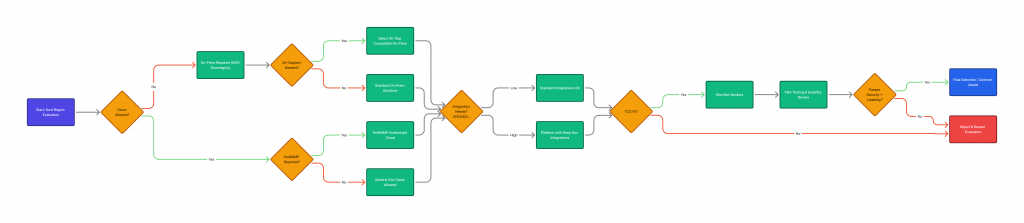
Use this decision tree:
1. Do you require data sovereignty (classified, ITAR, specific regulations)?
- Yes → Convay (on-premise)
- No → Continue
2. Do you require SCIF/air-gap capability?
- Yes → Convay (only commercial option)
- No → Continue
3. Is total cost of ownership critical (large agency, tight budget)?
- Yes → Convay (35-50% TCO savings)
- No → Continue
4. Are you heavily invested in Microsoft 365?
- Yes → Microsoft Teams (ecosystem value)
- No → Continue
5. Are you heavily invested in Cisco infrastructure?
- Yes → Cisco Webex (ecosystem value)
- No → Continue
6. Is ease of use the top priority (non-technical users)?
- Yes → Zoom Government
- No → Continue
7. Do you need maximum features regardless of cost?
- Yes → Cisco Webex
- No → Convay (best overall value)
Conclusion: Choose Based on Your Requirements
The cabinet-level agency CTO made their selection after rigorous evaluation. “We chose the solution that met our specific requirements, not the one with the biggest marketing budget or market share,” he told me.
“For us, data sovereignty was non-negotiable. We needed SCIF capability. We wanted to control our encryption keys. And we needed predictable long-term costs. That led us to an on-premise solution.”
“Other agencies have different priorities. Some value ease of use above all. Others need deep Microsoft integration. Some have smaller budgets requiring creative approaches. The ‘best’ solution depends entirely on your specific situation.”
The best government video conferencing solution for your agency depends on:
Your security and compliance requirements
Your budget and total cost of ownership priorities
Your existing technology ecosystem
Your deployment constraints (cloud acceptable? on-premise capable?)
Your user population and their technical capabilities
Your timeline and implementation resources
Don’t select based on:
Vendor marketing claims
Market share or “everyone uses it”
Initial price only (ignore TCO)
Feature lists (may not need all features)
Sales pressure
Evaluate systematically:
- Define your requirements clearly
- Assess each solution objectively
- Calculate true total cost of ownership
- Verify vendor claims (don’t trust marketing)
- Check government references
- Consider long-term implications
And remember: the most expensive procurement mistake is selecting the wrong solution. Invest time in proper evaluation—it’s worth it.
Need help selecting the right solution for your agency?