Introduction
A university professor told me about the moment she knew everything had changed. It was March 2020, and she had 48 hours to move an entire semester of organic chemistry lectures—complete with complex molecular diagrams, lab demonstrations, and hands-on problem-solving—into an online format.
“I felt like I’d been handed a hammer and told to perform surgery,” she said.
Three years later, she runs a blended learning program that students rate higher than her previous in-person-only classes. Student performance improved by 12%. Attendance increased. Even students who live on campus often join remotely because the digital experience is so effective.
What changed? She stopped trying to replicate the physical classroom online and started leveraging what education video conferencing does uniquely well—personalized attention at scale, recorded content for revision, breakout discussions, real-time collaboration, and accessibility for diverse learning needs.
Her story isn’t unique. I’ve worked with dozens of educational institutions over the past five years—from K-12 schools to research universities, from rural districts with bandwidth challenges to elite institutions with unlimited budgets. The pattern is clear: institutions that embrace video conferencing strategically transform educational outcomes. Those that treat it as a temporary crisis measure struggle endlessly.
A rural school district serving 3,000 students implemented strategic video conferencing and suddenly offered AP courses they couldn’t staff locally—connecting students to expert teachers 500 miles away. College admission rates increased 23% in two years.
A medical school conducting clinical training couldn’t provide enough in-person patient interactions for all students. Video conferencing enabled remote patient consultations, dramatically expanding training opportunities while maintaining quality. Students reported feeling better prepared for residency.
A language learning program connected students directly with native speakers across the globe for daily conversational practice. Language proficiency scores improved 34% compared to textbook-only instruction.
But I’ve also seen disasters. Schools that deployed video conferencing without training teachers. Universities that chose platforms based on price alone without considering pedagogy. Institutions that implemented technology without rethinking instructional design.
The difference between success and failure isn’t the technology—it’s how thoughtfully institutions deploy it.
This comprehensive guide gives you everything you need to transform education through video conferencing. You’ll learn which platforms work for different educational contexts, how to design effective online learning experiences, strategies for engagement that actually work, and practical implementation approaches that avoid common pitfalls.
Whether you’re a K-12 administrator planning district-wide deployment, a university professor redesigning courses for hybrid delivery, or an educational technology coordinator evaluating platforms, this guide provides the roadmap you need.
Let’s start with the fundamental question: What makes education video conferencing different from business video conferencing?
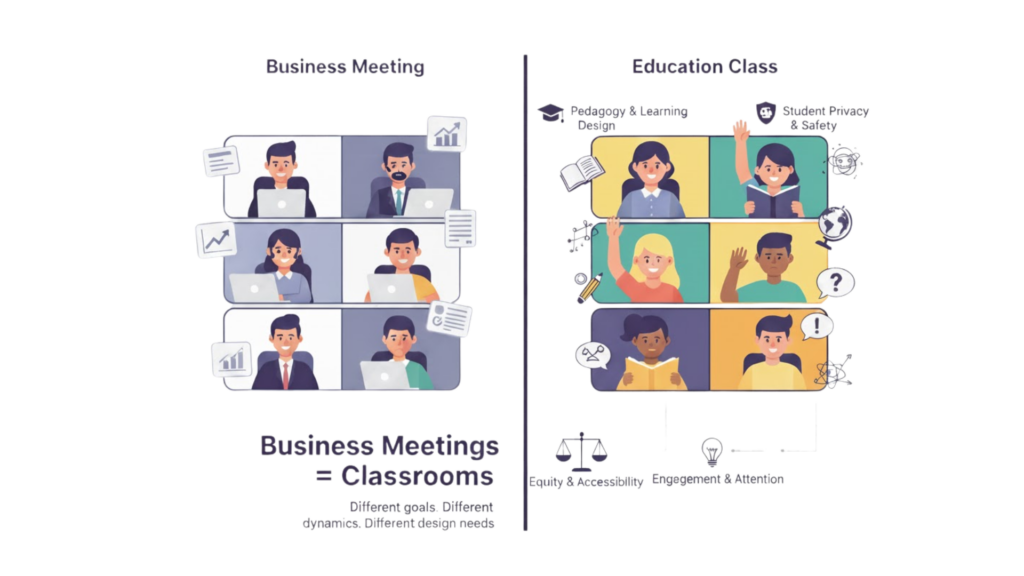
Why Education Video Conferencing Is Different
When businesses moved to remote work, they basically replicated meetings online. When education moved remote, it exposed how different teaching is from standard business communication.
Think of the difference between a lecture hall and a conference room. Both hold people. But the dynamics, interactions, and requirements are fundamentally different.
(1) The Pedagogical Challenge
A high school teacher manages 30 teenagers with varying attention spans, learning abilities, technical skills, and home environments—while delivering curriculum that must meet state standards, engage diverse learners, and prepare students for standardized tests.
That’s vastly different from a business meeting where adults choose to attend, share common context, and have professional incentive to engage.
One middle school discovered this painfully. They deployed the same video platform their district office used for administrative meetings. Teachers immediately struggled: No tools for taking attendance. No way to verify students were actually paying attention versus playing games in another window. No built-in assessment capabilities. No screen monitoring to ensure students weren’t sharing answers during tests.
The platform worked perfectly for adult meetings. It was disastrous for classroom instruction because it wasn’t designed for pedagogy.
(2) The Scale and Diversity Challenge
A university might need to support:
- 500-person lecture halls
- 15-person seminar discussions
- One-on-one office hours
- Lab demonstrations with specialized equipment
- Guest lectures from international experts
- Collaborative group projects
- Peer tutoring sessions
- Administrative meetings
Each scenario requires different capabilities. A platform optimized for one might fail spectacularly at another.
(3) The Privacy and Safety Challenge
When a seven-year-old joins a video class from home, you’re entering their family’s private space. When teenagers interact online, you’re responsible for their safety.
- Education video conferencing must address concerns businesses don’t face:
- FERPA compliance protecting student education records
- COPPA requirements for children under 13
- Parental consent for recording and data collection
- Child safety features preventing inappropriate contact
- Accessibility requirements ensuring all students can participate regardless of disabilities
One elementary school had a parent join a first-grade class and take screenshots of other children visible on screen—later posting them on social media without permission. The resulting privacy violation investigation lasted months.
Educational platforms need safeguards business platforms never consider.
(4) The Equity Challenge
In business, you generally assume participants have reliable devices and internet. In education, that assumption is dangerous.
A rural school district I worked with discovered 40% of students lacked home internet. Another 25% shared a single device among multiple siblings. Many joined classes from smartphones because the family laptop was too old to run video software.
Educational institutions must consider:
- Device diversity – Desktop computers, Chromebooks, tablets, smartphones of varying ages and capabilities
- Bandwidth constraints – Rural areas, low-income households, data-capped mobile connections
- Technical support – Many students and families lack tech sophistication
- Digital equity – Ensuring all students can access education regardless of home technology
Educational video conferencing must work on minimal technology, or it excludes the students who need education most.
Choosing the Right Platform for Your Educational Context
Not all video conferencing platforms work equally well for education. Let’s break down what works for different educational scenarios.
For K-12 Schools: Safety and Simplicity First
Elementary and secondary schools need platforms that prioritize student safety, are simple enough for children to use independently, and provide teachers with classroom management tools.
Essential features for K-12:
- Waiting rooms where teachers approve each student before admission
- Screen monitoring allowing teachers to see what students are doing
- Attention tracking showing teachers which students are actively engaged versus distracted
- Locked rooms preventing unauthorized entry once class starts
- Participant controls letting teachers mute all students, disable chat, and manage permissions
- Recording restrictions preventing students from recording classmates without permission
- Age-appropriate interfaces that young children can navigate without parent help
- Attendance tracking integrating with school information systems
One elementary school principal told me their selection came down to one question: “Can my kindergarten teacher manage 20 five-year-olds independently on this platform?” If the answer was no, the platform was eliminated.
Convay for K-12 education provides child-safe defaults with waiting rooms enabled, participant controls simplified for teacher use, and integration with school management systems for attendance and grading. Age-appropriate interfaces mean even young students navigate successfully.
For Higher Education: Flexibility and Academic Features
Universities need platforms supporting diverse pedagogical approaches—from massive lecture halls to intimate seminars, from clinical training to collaborative research.
Essential features for higher education:
- Scalability from small discussions to 500+ person lectures
- Breakout rooms for collaborative group work and discussions
- Polling and quizzes for formative assessment during class
- Screen annotation for working through problems collaboratively
- Recording with transcription for students to review lectures
- Integration with LMS (Canvas, Blackboard, Moodle) for seamless workflows
- Virtual office hours with waiting room queues
- Guest lecture capabilities bringing in external experts easily
- Research presentation tools for thesis defenses and conference presentations
A medical school I worked with needed something specific: the ability for instructors to spotlight multiple students simultaneously during case presentations. Most platforms spotlight one speaker at a time. They needed four medical students presenting different aspects of a case study—all visible prominently while the instructor observed and provided feedback.
Platform flexibility determines whether innovative pedagogies are possible or constrained by technology limitations.
For Vocational and Professional Training: Hands-On Learning
Technical training, apprenticeships, and professional development programs need platforms supporting demonstration, practice, and skill assessment.
- Essential features for vocational education:
- HD video quality for detailed visual demonstrations
- Multiple camera support showing different angles during technical demonstrations
- Screen sharing with annotation for software training
- Breakout rooms for practice with instructor rotation for feedback
- Recording with chapters letting students review specific techniques
- Assessment integration for skills testing and certification
One culinary school needed to demonstrate knife techniques clearly enough for students to see hand positions precisely. Standard video quality was insufficient. They needed HD with the ability to zoom into detail—plus recording so students could review techniques in slow motion during practice.
Vocational education often has specialized requirements mainstream platforms don’t anticipate.
For Tutoring and Enrichment Programs: Personalization at Scale
Tutoring services, test prep companies, and enrichment programs need platforms enabling one-on-one or small group instruction efficiently.
- Essential features for tutoring:
- Easy scheduling integration with automated reminders
- Virtual whiteboard for working through problems collaboratively
- Screen sharing for reviewing student work together
- Recording for review by students, parents, or quality assurance
- Session analytics tracking tutor effectiveness and student progress
- Payment integration for session billing
- Parent observation allowing parents to join silently
A test prep company serving 5,000 students with 200 tutors needed seamless scheduling where students booked sessions, tutors received notifications, and sessions started with one click. Manual coordination was impossible at scale.
Tutoring platforms must make coordination effortless or administrative overhead becomes unsustainable.
Designing Effective Online Learning Experiences
Technology enables online learning—but pedagogy determines whether it works. Let’s talk about instructional design for video conferencing.
The Fundamental Shift: From Teaching to Learning Design
A history professor spent 20 years perfecting her in-person lectures. Students loved her storytelling. Evaluations were consistently excellent.
Then pandemic forced remote teaching. She delivered the same lectures via video. Students hated it. Engagement plummeted. Grades dropped.
What changed? Nothing about her content or delivery. But what worked in person failed online because the environments are fundamentally different.
In a physical classroom:
- Students are somewhat captive (physically present with social pressure to engage)
- Visual cues indicate attention and confusion
- Energy flows between instructor and students
- Students can’t easily multitask
- Social presence creates engagement
Online:
- Students can disengage invisibly
- Cameras off means no visual feedback
- Energy doesn’t transmit through screens the same way
- Multitasking is effortless and invisible
- Social isolation reduces engagement pressure
The professor rebuilt her course around online learning principles rather than trying to replicate in-person experiences. She recorded shorter lecture segments (10-12 minutes each). She built in interactive elements every 8-10 minutes. She used breakout discussions for peer learning. She implemented collaborative online activities.
Student satisfaction returned to previous levels. Grades improved beyond in-person baseline.
The Attention Management Framework
Online learning faces an attention problem. In a physical classroom, attention wanders occasionally. Online, attention wanders constantly—because competing stimuli are literally one click away.
Research shows attention drops significantly after 10-15 minutes of passive video content. After 30 minutes, most students are mentally checked out regardless of content quality.
The solution isn’t trying to hold attention for 50-minute lectures. It’s designing around realistic attention spans.
Segment content into short chunks:
- 8-12 minute video segments covering specific concepts
- Active breaks between segments for processing and application
- Varied format (lecture, demonstration, discussion, activity)
Build interaction into the structure:
- Poll or quiz every 10 minutes
- Discussion questions between segments
- Think-pair-share activities in breakout rooms
- Problem-solving exercises applying concepts
Create accountability moments:
- Quick formative assessments
- Attendance verification through participation
- Random selection for questions
- Small group reporting back to main session
A biology professor teaching genetics redesigned his 90-minute class:
- 10-minute intro (concept overview)
- 5-minute breakout (discuss real-world application)
- 12-minute video (detailed explanation)
- 8-minute problem-solving (apply concept)
- 10-minute discussion (common misconceptions)
- 5-minute breakout (peer teaching)
- 12-minute demonstration (lab technique)
- 8-minute independent practice
- 10-minute Q&A and wrap-up
Student engagement and comprehension dramatically improved simply by restructuring the same content into attention-friendly segments.
The Social Learning Framework
Learning is fundamentally social. Humans learn best in community—through discussion, collaboration, peer teaching, and social feedback.
Online education often loses the social dimension, becoming isolated and impersonal. Students watch lectures alone, complete assignments alone, and feel disconnected.
Intentionally designing social learning experiences recreates community online:
Structured peer interaction:
- Regular breakout room discussions
- Peer review of assignments
- Collaborative projects requiring coordination
- Study groups with scheduled meeting times
Community building activities:
- Icebreakers and personal sharing
- Student presentations and showcasing work
- Peer recognition and appreciation
- Virtual social events
Accessible instructor presence:
- Regular office hours
- Quick response to questions
- Personal feedback on assignments
- Individual check-ins with struggling students
One online MBA program had terrible retention—students felt isolated and unmotivated. They redesigned around social learning: cohorts of 20 students taking classes together for two years, weekly small group discussions, peer mentoring, and monthly virtual social events.
Retention improved 64%. Student satisfaction scores doubled. Learning outcomes increased measurably.
The Active Learning Framework
Passive consumption of information is the least effective learning method. Active engagement—applying, analyzing, creating—drives deep learning.
Traditional lectures are passive. The instructor talks. Students listen and take notes. Learning is shallow and quickly forgotten.
Video conferencing enables active learning at scale through interactive features:
Real-time application:
- Polls testing comprehension immediately
- Problem-solving with instant feedback
- Case studies analyzed collaboratively
- Simulations and virtual labs
Collaborative construction of knowledge:
- Whiteboard brainstorming
- Shared document editing
- Peer teaching exercises
- Debate and discussion
Formative assessment:
- Quick quizzes identifying confusion
- One-minute papers summarizing key points
- Exit tickets checking understanding
- Concept mapping showing connections
A physics professor transformed his class from lecture-heavy to active learning. Instead of explaining concepts, he posed problems. Students worked in breakout groups applying principles. The class reconvened to discuss approaches. He guided them toward correct understanding through structured inquiry rather than direct telling.
Test scores improved 18%. More importantly, students could apply concepts to novel problems—demonstrating genuine understanding versus memorization.
Engagement Strategies That Actually Work
Keeping students engaged online is the challenge every educator faces. Let’s talk about strategies that have proven effective across thousands of classrooms.
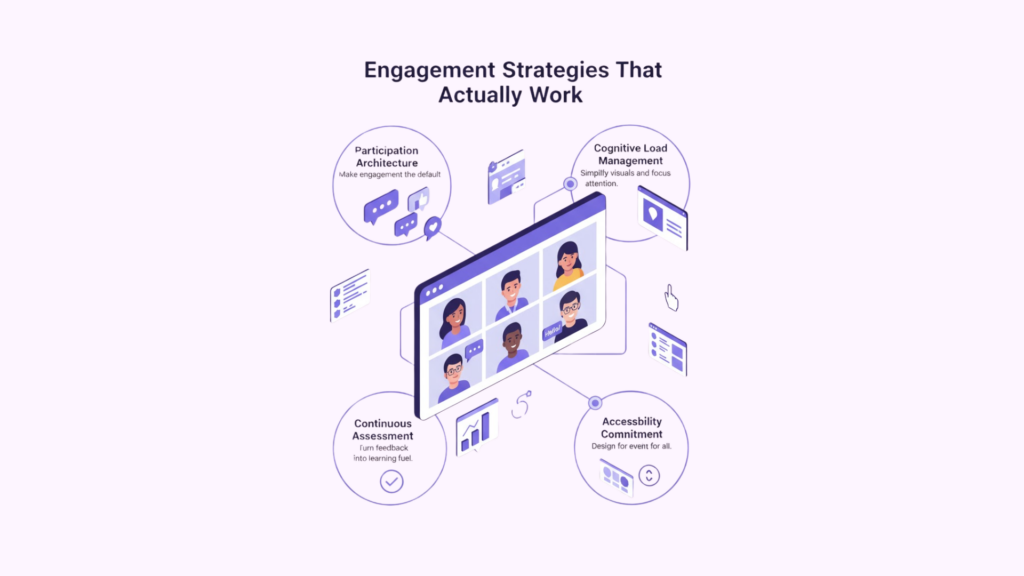
Strategy 1: The Participation Architecture
Engagement isn’t optional—it’s required. Build participation into your course structure so engagement is the path of least resistance.
Cold calling, but better: Instead of asking “Does anyone have thoughts?” (inviting silence), use structured participation:
- “Table 3, what did your breakout group conclude?”
- “Mai, what question does this raise for you?”
- “Everyone, in chat, share one word describing this concept”
Structured rotations: Assign roles that rotate each session:
- Discussion leader (guides small group discussion)
- Reporter (shares group thinking with class)
- Timekeeper (manages activity pacing)
- Questioner (poses challenging questions)
Mandatory micro-contributions: Require small, low-stakes contributions:
- React with emoji to indicate agreement/confusion
- One sentence in chat responding to question
- Vote in poll on preferred approach
- Share screen showing work in progress
One instructor implemented “participation points” tied to specific actions: posting in discussion, contributing to group work, asking questions, helping peers. Students earned points through dozens of micro-engagements rather than occasional big contributions.
Engagement became automatic because the course structure made participation expected, easy, and rewarded.
Strategy 2: The Cognitive Load Management
Online learning environments are cognitively demanding. Multiple windows. Chat scrolling. Video feeds. Notifications. Screen sharing. Simultaneous audio input.
Students experiencing cognitive overload simply tune out. Their brains protect themselves from information overwhelm by disengaging.
Manage cognitive load intentionally:
Minimize visual complexity:
- Turn off gallery view during instruction (too many faces to process)
- Use spotlight or speaker view (one focus point)
- Disable chat during complex explanations (reduce distraction)
- Share screens cleanly without desktop clutter visible
Provide structure and predictability:
- Consistent class format reduces mental processing
- Clear agenda shown at beginning
- Explicit transitions between activities
- Time warnings before shifts
Chunk information appropriately:
- One concept at a time
- Pause for processing
- Check understanding before advancing
- Review frequently
Reduce multitasking demands:
- Don’t expect students to watch, listen, read chat, and take notes simultaneously
- Provide transcripts or notes so students can focus on listening
- Use audio-only during complex explanations (video adds cognitive load)
- Give focused time for different tasks rather than demanding parallel processing
A chemistry professor noticed students struggled during demonstrations. He was narrating while showing complex procedures, pointing out details, and expecting students to follow along and take notes.
He changed approach: Silent demonstration first (students just watch). Brief narration identifying key points (students listen without note-taking pressure). Repeat demonstration with pauses (students annotate screenshots). Discussion of technique.
Student comprehension of lab techniques improved dramatically simply by separating visual processing from note-taking.
Strategy 3: The Assessment Integration
Assessment shouldn’t be something that happens at the end of the unit. It should be woven throughout learning, providing constant feedback to students and instructors.
Video conferencing enables continuous formative assessment:
Real-time comprehension checks:
- Quick polls after each concept
- Emoji reactions (thumbs up = got it, confused face = lost)
- Chat responses to simple questions
- Show of hands through reaction features
Collaborative problem-solving:
- Breakout groups work through problems
- Instructor rotates through rooms observing
- Groups share solutions and discuss approaches
- Immediate feedback and clarification
Peer assessment:
- Students evaluate each other’s work
- Provides multiple perspectives
- Reinforces learning through evaluation
- Distributes assessment load
Digital exit tickets:
- Last 3 minutes of class
- Students submit: one thing learned, one question remaining, one application idea
- Instructor reviews before next session
- Addresses confusion at start of next class
One instructor implemented “misconception of the day” based on exit tickets. Each session started by addressing the most common confusion from previous class. Students loved it—they felt heard, and persistent misunderstandings were corrected before compounding.
Continuous assessment creates feedback loops that improve learning in real-time rather than discovering problems weeks later on exams.
Strategy 4: The Accessibility Commitment
Accessible design isn’t just about compliance—it’s about effective teaching. When you design for accessibility, you improve learning for everyone.
Captions benefit:
- Deaf and hard-of-hearing students (obviously)
- Non-native speakers processing language
- Students in noisy environments
- Anyone whose auditory processing needs visual reinforcement
Visual descriptions benefit:
- Blind and low-vision students
- Students with attention challenges who need verbal guidance
- Anyone listening without watching screens
Flexible participation options benefit:
- Students with anxiety about speaking publicly
- Introverts who process thoughts through writing
- Students balancing work and family obligations
- Anyone needing time to formulate thoughtful responses
Multiple representation formats benefit:
- Students with learning disabilities
- Different learning style preferences
- Anyone reviewing content after class
- Students joining asynchronously due to illness or time zones
One professor made all lectures available as:
- Live synchronous video session
- Recorded video with captions
- Written transcript
- Audio-only podcast format
- Summarized notes with key points
Students loved having options. Many attended live sessions but reviewed transcripts later for exam prep. International students listened to audio during commutes. Students with slow internet downloaded transcripts when video streaming was problematic.
Accessibility isn’t burden—it’s better teaching that serves all students more effectively.
Technical Best Practices for Educators
Pedagogy matters most—but technology that doesn’t work undermines even the best teaching. Let’s cover technical practices that prevent problems.
Before Class: The Preparation Checklist
Technical problems are stressful and waste valuable teaching time. Most are preventable with proper preparation.
Test everything 30 minutes before class:
- Join your own meeting and verify video and audio work
- Share screen and verify content displays properly
- Test any videos or multimedia embedded in presentations
- Check that breakout rooms are configured correctly
- Verify polls or quizzes are loaded and functional
Have backup plans ready:
- Phone dial-in option if internet fails
- Alternative activity if video sharing breaks
- Colleague’s phone number for emergency tech support
- Plan B lesson if complete platform failure
Set up virtual classroom environment:
- Waiting room enabled
- Participant permissions appropriate for activity
- Breakout rooms pre-assigned if using groups
- Recording settings configured
- Chat and reaction features set appropriately
One instructor created a “tech checklist” she ran through 15 minutes before every class. It took 5 minutes but prevented dozens of mid-class technical problems that previously disrupted learning.
During Class: The Management Practices
Once class starts, technology should fade into background—not dominate attention.
Start with tech check-in:
- First 2 minutes let students verify audio and video
- Quick poll: “Can you see and hear me clearly?”
- Address tech issues before content begins
- Share troubleshooting link in chat
Monitor engagement indicators:
- Watch for students who’ve gone idle or disconnected
- Notice students who haven’t participated
- Check chat for technical problems or questions
- Observe video feeds for signs of confusion
Use co-host or assistant:
- Someone monitoring chat while you teach
- Triaging technical questions
- Managing breakout rooms
- Admitting late students from waiting room
Maintain backup communication:
- Email students can use if they get disconnected
- Phone number for emergency technical issues
- Class GroupMe or WhatsApp for peer support
- Document with class materials if video fails
A high school teacher always has a student “tech monitor” each class—a rotating role where one student watches for technical problems, manages chat questions, and helps peers with issues. She can focus on teaching while the tech monitor handles technical coordination.
Distributed tech support prevents any single technical problem from derailing the entire class.
After Class: The Follow-Up Practices
Learning doesn’t end when class ends. Post-class practices extend and reinforce learning.
Post recordings promptly:
- Edit out pre-class and post-class chatter
- Add chapter markers for easy navigation
- Include captions for accessibility
- Organize in logical location with clear naming
Share supplementary materials:
- Slides or notes from presentation
- Links mentioned during discussion
- Additional resources for deeper exploration
- Practice problems or exercises
Communicate about technical issues:
- Email students who had problems
- Offer alternative ways to make up missed content
- Provide tech support resources
- Collect feedback on what worked and what didn’t
Review analytics and engagement data:
- Which students attended?
- Who participated actively?
- Where did engagement drop?
- What technical issues occurred?
Use this data to continuously improve. If engagement always drops at 35 minutes, restructure the class. If certain students never participate, reach out individually. If technical problems repeat, investigate root causes.
Implementation: From Pilot to Full Deployment
You’re convinced video conferencing can transform education at your institution. Now what? Let’s talk about implementation that actually works.
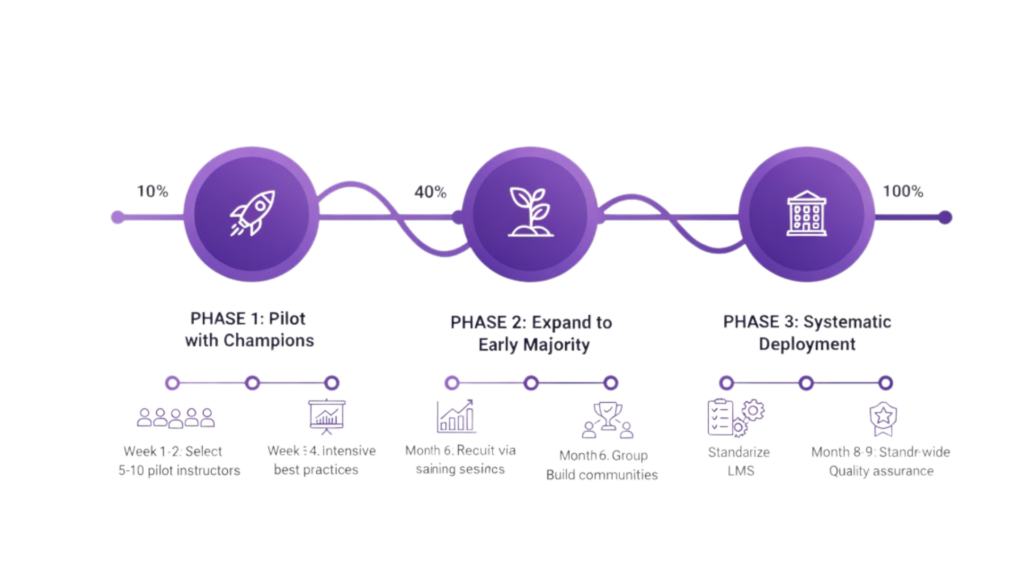
Phase 1: Pilot with Champions (Weeks 1-4)
Don’t try to implement institution-wide immediately. Start with enthusiastic early adopters who’ll work through problems and become internal evangelists.
Select 5-10 pilot instructors who:
- Are tech-comfortable (not necessarily experts, but not resistant)
- Teach diverse subjects and grade levels
- Have strong teaching skills (technology won’t fix bad teaching)
- Are opinion leaders among peers
- Will provide honest feedback
Provide intensive support:
- Hands-on training focused on their specific use cases
- Ongoing technical assistance
- Instructional design consultation
- Regular check-ins to address problems
Document everything:
- What works and what doesn’t
- Technical issues encountered
- Pedagogical challenges and solutions
- Student feedback and outcomes
Build exemplar cases:
- Video examples of effective online teaching
- Templates and lesson plans others can adapt
- Best practices documentation
- Student work and outcomes
One university started with 8 faculty across different departments. After one semester, these champions became trainers for the next wave—sharing real experiences rather than theoretical possibilities. Faculty trusted peers more than technology coordinators.
Peer-to-peer scaling is more effective than top-down mandates.
Phase 2: Expand to Early Majority (Months 2-4)
Leverage pilot success to expand to instructors ready to adopt with support.
Recruit through social proof:
- Pilot instructors share experiences at faculty meetings
- Student testimonials about improved learning
- Data showing attendance, engagement, or outcome improvements
- Demonstrations of effective practices
Provide structured support:
- Group training sessions
- Peer mentoring from pilot instructors
- Resource library with templates and examples
- Dedicated technical support during initial sessions
Create communities of practice:
- Regular meetings to share challenges and solutions
- Online forums for quick questions
- Lesson study groups analyzing teaching together
- Recognition of innovative practices
Address concerns directly:
- Technical training reducing intimidation
- Pedagogical support improving effectiveness
- Time investment is temporary during transition
- Student outcomes improve with practice
One school district created “video conferencing office hours” where teachers could drop in for help planning lessons, troubleshooting technical issues, or just talking through concerns. This low-pressure support reduced resistance and accelerated adoption.
Phase 3: Systematic Deployment (Months 5-12)
With proven success and growing adoption, implement institution-wide with proper infrastructure.
Standardize platform and practices:
- Official platform selection with training
- Documented best practices and expectations
- Technical standards for quality
- Support resources and help desk
Build permanent support infrastructure:
- IT support trained on platform
- Instructional designers helping faculty
- Student technical support resources
- Documentation and training materials
Integrate with existing systems:
- LMS integration for seamless workflow
- Student information system connection
- Grade book and attendance integration
- Single sign-on implementation
Establish quality assurance:
- Classroom observation protocols
- Student feedback mechanisms
- Learning outcome assessment
- Continuous improvement processes
Plan for sustainability:
- Faculty development programs
- New faculty onboarding includes video conferencing
- Regular platform evaluation and updates
- Budget allocation for ongoing support
One college made video conferencing competency part of faculty review process—not punitively, but as professional development expectation. This signaled the permanent shift from “emergency remote teaching” to “integrated digital pedagogy.”
Why Convay Serves Education Better
Throughout this guide, I’ve explained how to transform education through video conferencing. Now let me show you why Convay serves educational institutions more effectively than consumer platforms.
Built for Educational Use Cases
Many platforms were designed for business then adapted for education. Convay was built understanding educational requirements from the start.
- Classroom management tools giving teachers control appropriate for managing students, not business colleagues
- Age-appropriate interfaces designed for children and young adults, not corporate professionals
- Educational integrations with LMS platforms, student information systems, and educational tools
- Attendance and engagement tracking meeting academic accountability requirements
- Assessment features supporting formative and summative evaluation
One elementary school chose Convay specifically because teachers could manage 25 seven-year-olds independently. Previous platform required constant technical intervention from IT staff.
Security and Privacy for Students
Student privacy isn’t just important—it’s legally mandated. Convay provides comprehensive protection.
- FERPA compliance protecting student education records
- COPPA compliance for children under 13
- Data sovereignty keeping student data under institutional control
- End-to-end encryption protecting class discussions
- Granular privacy controls managing recording, screenshots, and data collection
Audit logging documenting access to student information
One university chose Convay after discovering their previous platform stored student data in multiple countries without proper data processing agreements—creating GDPR and FERPA violations.
Equity Through Technical Excellence
Convay’s intelligent bandwidth management ensures students with limited technology can still participate fully.
- Adaptive streaming optimizing quality for each student’s connection
- Low-bandwidth modes working on constrained networks
- Mobile optimization supporting students joining from phones
- Offline capabilities allowing lesson downloads for later viewing
- Multi-device flexibility working on old computers, Chromebooks, tablets
One rural school district serves students where 60% lack broadband. Convay’s low-bandwidth mode enabled participation impossible on competitor platforms requiring high-speed connections.
Pedagogical Innovation Support
- Convay provides features enabling innovative teaching, not just replicating traditional lectures.
- Flexible breakout rooms for collaborative learning
- Interactive whiteboards for problem-solving together
- Polling and assessment for formative evaluation
- Recording with chapters for easy navigation and review
- Screen annotation for collaborative markup
Reaction features providing immediate feedback
One progressive school built project-based learning around Convay’s collaboration features—students working in virtual teams, presenting findings, peer reviewing work, and connecting with external experts. Previous platform’s limited interaction features constrained pedagogical innovation.
Cost-Effectiveness for Education Budgets
Educational institutions face tight budgets. Convay provides superior value.
- Educational pricing recognizing institutional constraints
- No per-student fees enabling unlimited participation
- Included storage for recordings and materials
- Comprehensive support without premium tiers
- Volume discounts for district or system-wide deployment
One district calculated Convay saved 40% compared to competitors while providing superior features. The savings funded professional development, making implementation more successful.
The Future of Education Video Conferencing
Video conferencing isn’t a temporary accommodation—it’s permanently transformed education. Let’s look at where it’s heading.
Hybrid Learning as Permanent Model
Most institutions aren’t returning to 100% in-person. They’re embracing hybrid models combining the best of both.
Students attending remotely when:
- Illness prevents campus attendance but not learning
- Weather or transportation creates barriers
- Work or family obligations require flexibility
- Geographic distance makes in-person unrealistic
Students attending in-person for:
- Labs requiring physical equipment
- Clinical experiences with patients or clients
- Social activities and community building
- High-interaction collaborative work
One university implemented “flexible attendance” where students choose daily whether to attend physically or virtually based on their circumstances. Attendance increased 15% because students no longer missed class for minor illness, weather, or scheduling conflicts.
AI-Enhanced Learning Experiences
Artificial intelligence is being integrated into educational video conferencing, enabling capabilities impossible before.
- Real-time transcription with translation allowing international students to follow lectures in their language
- Automatic summaries providing study guides from recorded lectures
- Engagement analytics identifying struggling students before they fail
- Adaptive content adjusting difficulty based on student comprehension
- Smart breakout groups matching students for effective collaboration
One professor uses AI transcription to identify concepts students find confusing based on repeated questions. He addresses these systematically rather than moving forward while students remain confused.
Global Classrooms and Expert Access
Video conferencing eliminates geographic constraints, enabling connections previously impossible.
- Guest lectures from experts anywhere in the world
- International collaborations between students in different countries
- Specialized courses taught by experts to students across multiple institutions
- Cultural exchange through direct student-to-student connections
- Professional mentorship connecting students with industry leaders
One high school partners with universities in five countries. Students take advanced courses from international experts, collaborate on global projects, and build international networks—impossible without video conferencing.
Personalized Learning at Scale
Video conferencing enables personalization impossible in traditional classrooms.
- Office hours with waiting queues providing individual attention efficiently
- Small group instruction for students at similar levels
- Peer tutoring scaled through structured online sessions
- Recorded content students can review at their own pace
- Adaptive pathways where students progress when ready, not on fixed schedules
One math program uses video conferencing for personalized instruction. Students work independently on adaptive software, with teachers conducting small group video sessions for students working on similar concepts. Progress accelerated because instruction matched readiness level.
Your Action Plan: Getting Started Today
You now have comprehensive understanding of education video conferencing. Here’s your roadmap for implementation.
For K-12 Schools and Districts
- Immediate actions:
- Audit current capabilities and identify gaps
- Survey teachers about challenges and needs
- Pilot video conferencing with 3-5 enthusiastic teachers
- Evaluate platforms specifically for K-12 use cases
- Develop acceptable use policies for students and families
3-month goals:
- Expand pilot to 20% of teachers with strong support
- Provide professional development on online pedagogy
- Establish technical support infrastructure
- Gather data on attendance, engagement, outcomes
- Document best practices and create templates
12-month vision:
- All teachers competent with video conferencing
- Hybrid learning options available district-wide
- Expanded course offerings through video connections
- Professional development delivered partially online
- Community engagement through virtual meetings
For Colleges and Universities
Immediate actions:
- Form cross-functional implementation team (IT, faculty, instructional design, administration)
- Assess current platform capabilities and gaps
- Identify innovative faculty to serve as pioneers
- Review privacy and compliance requirements
- Evaluate platform options for higher ed
3-month goals:
- Pilot program with 10-15 faculty across disciplines
- Instructional design support for online course development
- Faculty community of practice sharing innovations
- Student feedback on online learning experience
- Initial data on learning outcomes
12-month vision:
- 50% of courses offering flexible attendance options
- Strategic hybrid programs leveraging online components
- Professional development program for online teaching
- Quality standards for online/hybrid courses
- Expanded access through online programming
For Individual Educators
Immediate actions:
- Experiment with video conferencing for office hours
- Attend training or find online resources
- Connect with colleagues using video conferencing effectively
- Redesign one lesson for online delivery
- Test platform features with small group
3-month goals:
- Comfortable teaching full course online if needed
- Developed personal best practices and techniques
- Built library of effective activities and strategies
- Solicited and incorporated student feedback
- Mentoring colleagues exploring online teaching
12-month vision:
- Excellent online teaching skills
- Innovative hybrid course designs
- Sharing expertise through training or publications
- Continuing to develop and refine practice
- Advocating for educational technology advancement
Conclusion: Education Transformed
Here’s what I’ve learned working with educational institutions for the past five years:
Video conferencing isn’t about replicating physical classrooms online. It’s about leveraging unique capabilities that were never possible before—personalized attention at scale, expert access regardless of geography, flexible learning fitting diverse student needs, recorded content for review and revision, collaborative learning transcending physical boundaries.
The institutions succeeding aren’t the ones with the most expensive technology. They’re the ones thinking most carefully about pedagogy—how humans learn, what students need, how to design experiences that engage and inspire.
Convay was built specifically for educational institutions that understand technology serves learning, not the reverse. Every feature, every capability, every design decision prioritizes effective teaching and meaningful learning.
The future of education isn’t fully online or fully in-person—it’s thoughtfully integrated. Using video conferencing strategically to expand access, increase flexibility, enable innovation, and ultimately improve learning outcomes for all students.
Your next class could be the one that changes a student’s life. The question is: Are you leveraging every tool available to make that possible?
Ready to transform education at your institution?