Introduction
A marketing director at a SaaS company once told me about their $50,000 mistake. They hosted a product launch webinar expecting 1,200 attendees. Halfway through the CEO’s demo, the platform crashed. Participants dropped. Chat stopped working. Screen sharing froze.
The webinar that was supposed to generate $2 million in pipeline? It generated apologies, refund requests, and a scramble to reschedule.
The brutal part? They had chosen their webinar platform based on a flashy sales demo—never actually testing it under realistic conditions. The platform worked beautifully for the vendor’s 50-person demo. It collapsed under the weight of their actual audience.
I’ve evaluated dozens of enterprise webinar platforms over the past decade. Here’s what I’ve learned: The difference between platforms that work and platforms that fail isn’t always obvious until you’re in the middle of a high-stakes event with thousands of people watching.
A financial services firm hosting investor education webinars chose a consumer-grade platform because it was cheap. Their compliance team later discovered the platform couldn’t provide the recording retention and audit trails their regulations required. They had to migrate mid-quarter—recreating hundreds of recordings, rebuilding registration workflows, and explaining to regulators why they’d been non-compliant for six months.
A healthcare organization conducting medical training webinars selected a platform with impressive engagement features. Then they discovered the platform stored all data overseas—violating their data residency requirements for patient information. The webinar program was suspended pending a complete platform replacement.
This guide cuts through the marketing hype to show you what actually matters when choosing an enterprise webinar platform. You’ll see how leading platforms compare on capabilities that determine whether your webinars succeed or fail.
By the end, you’ll know exactly which platform fits your organization’s specific needs—not based on vendor promises, but on real capabilities that matter for enterprise use.
What Makes a Webinar Platform “Enterprise-Grade”?
Before comparing specific platforms, let’s establish what “enterprise” actually means beyond marketing terminology.
Think of the difference between a bicycle and a bus. Both provide transportation. But when you need to move 50 people across town reliably on a schedule, the bicycle isn’t just inadequate—it’s absurd.
Scale That Actually Works
Consumer webinar tools claim to support “hundreds” of attendees. Enterprise platforms reliably handle thousands—or even tens of thousands—simultaneously without degradation.
A technology company I worked with hosted quarterly earnings calls with 5,000+ investors and analysts. Their previous “enterprise” platform started having audio quality issues above 2,000 participants. They switched to a true enterprise solution that handled 8,000 participants flawlessly during their next call.
The difference? Infrastructure specifically architected for massive concurrent load versus platforms hoping their infrastructure scales.
Security That Meets Regulatory Requirements
Enterprise means your webinars contain sensitive information—product launches, financial results, strategic plans, customer data, proprietary research.
One pharmaceutical company conducting investigator meetings about clinical trials needed end-to-end encryption, data residency controls, and comprehensive audit trails. Half the platforms they evaluated couldn’t meet basic requirements. The platforms weren’t “bad”—they just weren’t built for regulated industries.
Integration With Business Systems
Your webinar platform doesn’t exist in isolation. It needs to connect with your CRM, marketing automation, analytics platforms, and business systems.
A B2B software company generates 60% of their pipeline through webinars. Their platform automatically logs attendees to Salesforce, triggers nurture campaigns based on engagement, updates lead scores, and provides attribution data to marketing analytics—creating seamless workflows that manual processes couldn’t match.
Consumer platforms offer basic integrations. Enterprise platforms provide deep, bidirectional connections that make webinars part of your business engine rather than standalone events.
The Comparison Framework: What Actually Matters
Let’s evaluate platforms on factors that determine success—not feature checklists that look impressive but don’t impact results.
Capacity and Performance
What to evaluate:
- Maximum attendee capacity per webinar
- Tested capacity versus marketed capacity
- Performance at maximum load
- Bandwidth requirements per attendee
- Support for low-bandwidth participants
Why it matters: A platform might claim “10,000 participant capacity” based on theoretical limits. Real performance at 10,000 attendees often tells a different story—degraded video, audio dropouts, and interaction failures.
Security and Compliance
What to evaluate:
- End-to-end encryption availability
- Data residency controls
- Compliance certifications (SOC 2, HIPAA, GDPR)
- Access controls and authentication options
- Audit logging capabilities
- Recording security and retention management
Why it matters: One compliance violation during a webinar can cost more than a decade of platform fees. Platforms without proper security expose organizations to risks that dwarf cost savings.
Engagement and Interaction Tools
What to evaluate:
- Q&A management and moderation
- Polling and survey capabilities
- Chat functionality at scale
- Breakout room support
- Hand-raise and reaction features
- Whiteboard and collaboration tools
Why it matters: Passive webinars lose audience attention rapidly. Engagement tools keep audiences active—but only if those tools actually work at enterprise scale. Many interaction features collapse when participant counts exceed a few hundred.
Production Quality and Presenter Tools
What to evaluate:
- HD video and audio quality
- Screen sharing and presentation tools
- Multiple presenter management
- Spotlight and layout controls
- Branding and customization options
- Backstage and presenter preview features
Why it matters: Enterprise webinars represent your brand. Poor production quality—pixelated video, choppy audio, unprofessional presentation—reflects poorly on your organization regardless of content quality.
Analytics and Reporting
What to evaluate:
- Attendee engagement metrics
- Registration and attendance rates
- Interaction tracking (polls answered, questions asked)
- Drop-off analysis
- Individual attendee activity
- Integration with business intelligence tools
Why it matters: You can’t improve what you don’t measure. Platforms providing comprehensive analytics let you optimize webinar performance. Platforms with basic reporting leave you guessing what works.
Total Cost of Ownership
What to evaluate:
- Base platform pricing
- Per-attendee or per-event fees
- Storage costs for recordings
- Premium feature charges
- Integration costs
- Support and training costs
Why it matters: “Cheap” platforms often have hidden costs that make them more expensive than premium alternatives. Calculate 3-year total cost including all fees, not just initial pricing.
Platform Comparison: The Major Players
Let’s compare how leading platforms stack up across enterprise requirements.
Convay: Built for Enterprise from the Ground Up
Best for: Organizations prioritizing security, sovereignty, and large-scale capacity
Key Strengths:
Massive scale capacity: Reliably supports 10,000+ participant webinars without degradation. One government agency regularly hosts 15,000-participant national broadcasts on Convay without issues.
Sovereign deployment options: On-premise, private cloud, or hybrid deployment means data stays exactly where your compliance requires. A financial institution uses Convay specifically because they can keep all webinar data within their own data centers.
True end-to-end encryption: Unlike platforms claiming encryption while holding decryption keys, Convay provides genuine end-to-end encryption where the platform never accesses unencrypted content.
Comprehensive engagement tools: Moderated Q&A handling thousands of questions, real-time polls with instant visualization, breakout rooms for interactive segments, and chat that works smoothly even with 5,000+ participants.
Enterprise integrations: Deep connections with Salesforce, HubSpot, Marketo, Microsoft 365, and custom systems through well-documented APIs.
Advanced analytics: Real-time engagement dashboards, detailed attendee behavior tracking, and business intelligence integration providing actionable insights.
Pricing model: Transparent licensing based on organizational needs rather than per-attendee fees that create unpredictable costs.
Ideal use cases:
- Government agencies requiring data sovereignty
- Financial institutions with strict compliance requirements
- Healthcare organizations handling protected information
- Enterprises hosting massive all-hands or customer events
- Organizations needing complete control over webinar infrastructure
Potential limitations:
- Higher upfront investment than some cloud-only alternatives
- Implementation complexity for on-premise deployment
- May be over-spec’d for organizations with simple needs
Zoom Webinar: Consumer Familiarity Meets Enterprise Features
Best for: Organizations prioritizing ease of use and participant familiarity
Key Strengths:
User familiarity: Most participants already know Zoom, reducing friction and technical support burden.
Large capacity tiers: Plans supporting up to 50,000 view-only attendees for massive events.
Strong engagement features: Polls, Q&A, hand raising, and reactions keep audiences engaged.
Zoom ecosystem integration: Seamless connection with Zoom Meetings, Phone, and other Zoom products.
Pricing: Starting around $79/month for 500 attendees, scaling to custom enterprise pricing for larger capacities.
Potential limitations:
- Cloud-only deployment lacks data sovereignty options
- Security concerns based on past incidents
- Limited customization of participant experience
- Per-attendee pricing becomes expensive at scale
- Recording storage limits require management
Ideal use cases:
- Organizations already using Zoom for meetings
- Marketing teams running frequent smaller webinars
- Companies prioritizing participant ease of access
Cisco Webex Webinars: Enterprise Integration Powerhouse
Best for: Organizations deeply invested in Cisco infrastructure
Key Strengths:
Cisco ecosystem integration: Deep integration with Webex Meetings, Calling, and Cisco collaboration hardware.
Strong security heritage: Built on Cisco’s enterprise security foundation with certifications for regulated industries.
Hybrid event capabilities: Combines virtual webinars with in-person events seamlessly.
Capacity: Supports up to 100,000 video-on view-only attendees with appropriate plans.
Pricing: Enterprise pricing requires custom quotes based on needs.
Potential limitations:
- Interface complexity—powerful but steep learning curve
- Can feel overbuilt for simple webinar needs
- Premium features locked to higher tiers
- Best value requires full Webex ecosystem commitment
Ideal use cases:
- Enterprises standardized on Cisco infrastructure
- Organizations running hybrid in-person and virtual events
- Companies needing deep UC integration
ON24: Marketing-Focused Webinar Specialist
Best for: Marketing teams running webinars as lead generation engines
Key Strengths:
Marketing automation integration: Deep native connections with Marketo, Eloqua, HubSpot, and Salesforce for automated workflows.
Engagement scoring: Sophisticated attendee engagement scoring feeding directly into lead scoring models.
Content hub: Evergreen content library turning live webinars into on-demand assets.
Customization: Extensive branding and custom experience options.
Pricing: Premium positioning with enterprise pricing requiring custom quotes.
Potential limitations:
- Premium pricing higher than many alternatives
- Marketing focus may not fit other use cases
- Requires investment in learning platform complexity
- Limited security options for highly regulated industries
Ideal use cases:
- B2B marketing teams running regular webinar programs
- Demand generation focused organizations
- Companies monetizing webinar content long-term
Microsoft Teams Live Events: Office 365 Integration
Best for: Organizations fully committed to Microsoft 365 ecosystem
Key Strengths:
Seamless Microsoft 365 integration: Native integration with Teams, SharePoint, Stream, and Office apps.
Included with some licenses: Organizations already paying for Microsoft 365 may have access included.
Enterprise security: Inherits Microsoft’s enterprise security, compliance, and data governance.
Capacity: Supports up to 10,000 attendees with appropriate licensing.
Pricing: Included with some Microsoft 365 plans; standalone pricing varies.
Potential limitations:
- Best for organizations already using Teams heavily
- Feature set lags specialized webinar platforms
- Attendee experience less polished than purpose-built platforms
- Limited analytics compared to marketing-focused tools
Ideal use cases:
- Internal company communications and all-hands meetings
- Organizations standardized on Microsoft 365
- Simple webinar needs without complex engagement requirements
Feature Comparison at a Glance
| Feature | Convay | Zoom Webinar | Webex Webinars | ON24 | Teams Live Events |
| Max Capacity | 10,000+ | 50,000 | 100,000 | 5,000+ | 10,000 |
| End-to-End Encryption | Yes | Optional | Optional | No | No |
| On-Premise Deployment | Yes | No | No | No | No |
| Data Sovereignty | Full Control | Limited | Limited | Limited | Limited |
| Marketing Automation | Strong | Good | Good | Excellent | Basic |
| Engagement Tools | Comprehensive | Strong | Strong | Excellent | Basic |
| Analytics | Advanced | Good | Good | Excellent | Basic |
| Ease of Use | Moderate | Excellent | Moderate | Moderate | Good |
| Pricing Transparency | High | Moderate | Low | Low | Moderate |
| Best For | Security & Scale | Familiarity | Cisco Ecosystem | Marketing | Microsoft Shops |
How to Choose the Right Platform for Your Organization
With platforms compared, here’s how to make your decision systematically.
Step 1: Define Your Non-Negotiables
Start with requirements that eliminate options immediately.
Security and compliance:
- Do regulations mandate data residency or sovereignty?
- Do you need end-to-end encryption?
- What compliance certifications are required?
If data sovereignty is non-negotiable, only Convay provides true on-premise deployment.
Scale requirements:
- What’s your largest anticipated webinar?
- How many webinars will you run simultaneously?
- What’s your expected growth over 3 years?
If you’ll regularly exceed 5,000 participants, your options narrow significantly.
Integration requirements:
- What business systems must your platform connect with?
- How critical is automation versus manual processes?
- Do you need real-time data synchronization?
Marketing-heavy organizations may prioritize ON24’s deep marketing automation. Microsoft-standardized organizations lean toward Teams.
Step 2: Calculate True Total Cost
Look beyond initial pricing to 3-year total cost of ownership.
Include:
- Base platform fees
- Per-attendee or per-event charges
- Storage and bandwidth costs
- Integration development and maintenance
- Training and support costs
- Hidden fees for “premium” features
One organization chose a “low-cost” platform at $5,000 annually. After adding per-attendee fees, storage charges, and integration costs, their actual spend was $35,000 annually—more than premium alternatives they’d rejected for being “too expensive.”
Step 3: Test Under Realistic Conditions
Never choose based on vendor demos. Test with your actual use cases.
Conduct stress tests:
- Simulate your largest anticipated webinar
- Test all engagement features at scale
- Verify integrations work with your actual systems
- Assess attendee experience across devices and networks
- Review analytics and reporting depth
One enterprise ran a 1,000-person test webinar on three platforms. Platform A (their front-runner) had audio degradation above 600 participants. Platform B worked flawlessly. The test prevented a catastrophic platform selection mistake.
Step 4: Evaluate Vendor Stability and Support
Your webinar platform is critical infrastructure. The vendor needs to be stable and supportive.
Consider:
- Financial stability and funding
- Product roadmap alignment with your needs
- Quality of customer support (response times, escalation processes)
- Frequency of updates and improvements
- Customer community and resources
Ask existing customers about support quality. Vendor promises matter less than customer experiences.
The Verdict: Which Platform Wins?
There’s no universal “best” platform—but there are best fits for different needs.
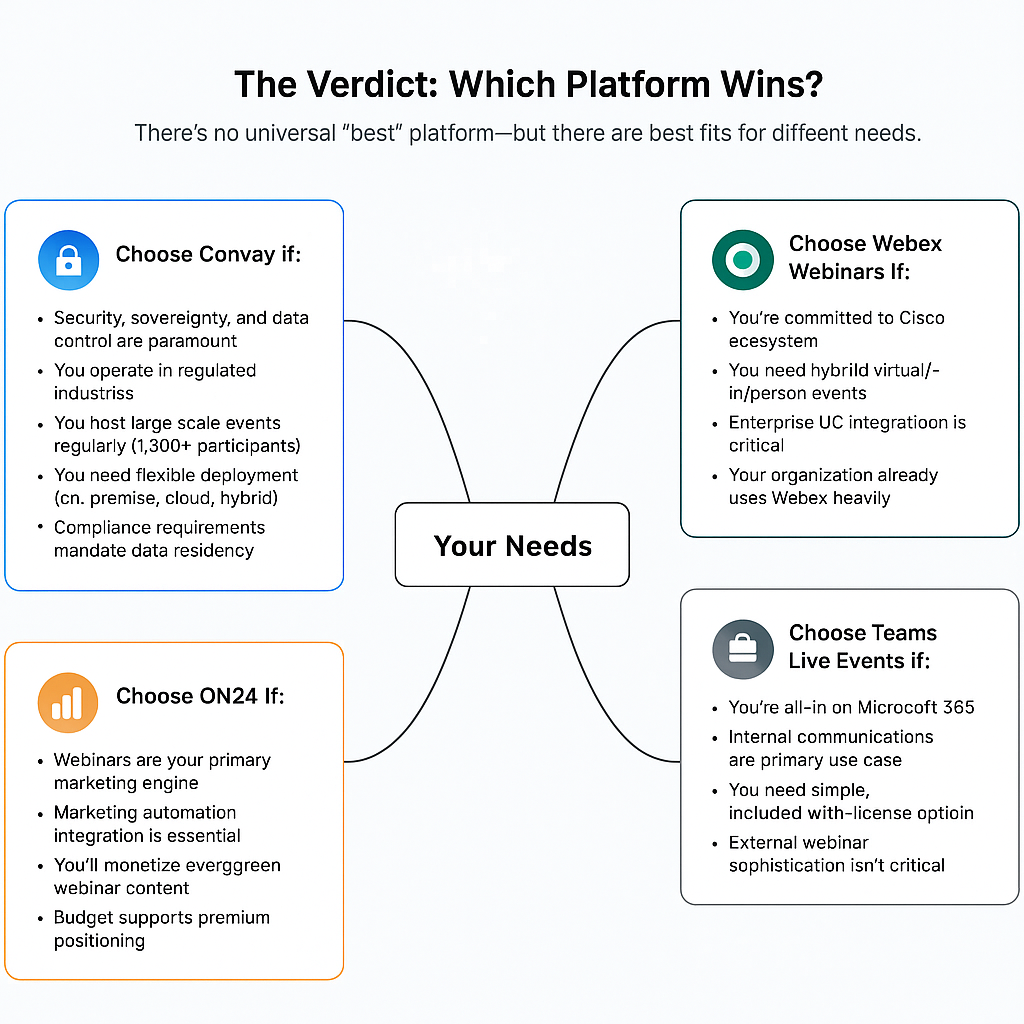
Choose Convay if:
- Security, sovereignty, and data control are paramount
- You operate in regulated industries
- You host large-scale events regularly (1,000+ participants)
- You need flexible deployment (on-premise, cloud, hybrid)
- Compliance requirements mandate data residency
Choose Zoom Webinar if:
- Ease of use and participant familiarity are priorities
- You need quick deployment without complexity
- Your security requirements are moderate
- Budget constraints are significant
- You already use Zoom for meetings
Choose Webex Webinars if:
- You’re committed to Cisco ecosystem
- You need hybrid virtual/in-person events
- Enterprise UC integration is critical
- Your organization already uses Webex heavily
Choose ON24 if:
- Webinars are your primary marketing engine
- Marketing automation integration is essential
- You’ll monetize evergreen webinar content
- Budget supports premium positioning
Choose Teams Live Events if:
- You’re all-in on Microsoft 365
- Internal communications are primary use case
- You need simple, included-with-license option
- External webinar sophistication isn’t critical
Take Action: Make Your Platform Decision
You now have comprehensive comparison of leading enterprise webinar platforms. Your next steps:
1. Audit your requirements
- Document non-negotiable security and compliance needs
- Identify maximum scale requirements
- List critical integration requirements
- Calculate realistic budget
2. Shortlist platforms matching your profile
- Eliminate platforms missing non-negotiables
- Focus on 2-3 finalists for deep evaluation
3. Conduct hands-on testing
- Run realistic stress tests
- Verify claims with actual usage
- Test integrations with your systems
4. Speak with Convay If security, scale, or sovereignty matter to your organization, schedule a consultation:
- Demo at your expected scale
- Discuss your specific compliance requirements
- Review deployment options
- Receive transparent pricing
Conclusion: Choose Based on Reality, Not Marketing
The right enterprise webinar platform isn’t the one with the flashiest demo or the longest feature list. It’s the one that works reliably when you have thousands of people watching, meets your security and compliance requirements, and integrates seamlessly with how your business operates.
Convay was built specifically for enterprises that can’t afford platform failures—where security isn’t negotiable, scale is essential, and sovereignty matters.
When your CEO is presenting to investors, when your product launch reaches thousands, when compliance auditors review your webinar data—you need a platform built for exactly those moments.
T